Sneak Peek on the Blog Designs in my Portfolio


Hi all! I've been busy but I really feel the 'urgency' to update here on my blog on the blog designs that I have been working on. Just to let you know that my Portfolio page is always updated from time to time. Feel free to check it out for *inspiration*. Soon I will start highlighting every work as featured design on this blog, like what I used to do. (I'm taking a note on this) It would help bringing traffic to my clients' sites as well :) 

I would like to show you Blogshop Design. So here is a sneak peek on some of the designs that I have worked on. They use gallery layout ( Blogshop Premium & Blogshop Standard).

blogshop design

blogshop design

blogshop design

blogshop design


Some clients preferred to use standard blog layout for their blogshops. Here are two designs that use Delicious Premium Design Package. 

blogshop design

blogshop design

Thanks for looking! :D Please come back for more updates.

A Tip to Host Your Image


I have an open secret that I would like to share! I'm talking for Blogger users who use the Blogger- free blog host service who always need other place to host their images. You know, especially for additional images used for other than blog posts'. As a blog designer, I need to upload my design images somewhere, so they can be used as your header, footer or banner! I understand that there are some cool image hosting providers online. But I just don't like to sweat myself uploading my images from other source which sometimes turns to be troublesome. So I place my images my own way, it is through Blogger itself!

Here's how I do it.

1. On the Blogger dashboard, create a new post. Simply click the pen image on the orange background.


2. On the Compose Tab, Insert an image.


Once it's uploaded, click on the image. Remember to make it Original Size.


3. Switch to HTML tab. The code of your upload image will look something as shown below. Select the image URL. So this is the address of your image!


You can also use this simple HTML code if you wish to display your image.
<img src="address of your image"></img>

I use one post to host my images and of course I never published this post! You too can do this. That's it, host your images on Blogger, as simple as 1, 2, 3!

How Branding With Infographic Leads to Direct Response

>>Click Here   or  


Do you want to click there? I bet you're more interested in clicking the one with the image cause it looks more interesting than the plain text "Click Here". Am I right? That's the reason why I love graphics. Graphics give clearer visual information.

Here's an interesting entry from my guest post, S. James about Infographic.


=================================================================================

Infographic or information graphics are visual presentation of data, knowledge or information to reach more people in a quick and easy way. Infographic is earning more and more popularity over time as the illustrative representation of data is easier to understand and comprehend for the common people. Direct response marketing is different from traditional marketing, as it creates immediate response from the consumers without any intermediate agents like retailers or sellers. The response of the consumers can be measured individually for each advertisement and the purchase ratio can also be quantified. The introduction of Infographic has brought an immense change in e-commerce and traditional marketing. This is a form of inbound marketing, which is replacing the conventional outbound marketing slowly but steadily. Infographic designing is important for branding of products to generate direct response from the targeted consumers.

Outbound marketing versus inbound marketing

Outbound marketing may be old-school of marketing but still it is more persistent and widely used form of marketing compared to inbound marketing. Direct advertisement through TV, radio, newspapers and direct contact with the customers through regular mails, emails and telemarketing is still more effective. Social marketing or marketing through social networks or inbound marketing is yet to take the place of direct marketing. In old style of marketing, the customers are more targeted and the communication is done in a direct way so the customer does not have many doubts before purchasing a product. The good points about old school marketing are:

•    Customer can receive clear and consistent message from the seller
•    Customers are able to get the better idea about the product
•    Call to action is possible
•    Direct and definitive response from the seller

On the other hand, inbound marketing have many restrictions like 

•    Excessive amount of message, even to other media
•    Customers do not know if the offer still exists or has expired
•    Call to action is not possible
•    Response is not guaranteed from the seller

Benefits of Direct response marketing

This kind of marketing has no waiting time for following reasons:

•    People are able to visit or hear about the advertisements instantaneously.
•    After the advertisement is displayed, the response comes immediately.
•    There is not much asking about what you offer.
•    Generally no maintenance cost is required

Infographic is more popular among tech-savvy young generation

Young kids and tech-savvy people spend more time in front of computers browsing through different websites. They like online shopping more that to shop in physical. Social networking sites are gaining more popularity over time. 

Branding works well in social media

A survey over different social media networks can clearly show which networking sites are more popular and more widely used over others. There are many social media sites now, like facebook and twitters, whose users have much larger networks. 

Surveying popularity pattern for a particular brand

It is possible to see the pattern of popularity for a certain brand over time. You can actually see how many people from facebook and twitters have actually visited or followed a brand, how many of them have liked it, how many have mentioned about it in their timeline and how many have actually posted it, shared a link, story or video.

Other facilities

It is also possible to have coupons, discounts and promotions in the social networking sites, see the news and updates for the brand and get answers for frequently ask questions and how-to questions. It is also possible to see the difference between most preferred contents versus the least popular ones.

How to send the updates

Short notifications in the social networking media is the most popular one, when notification by e-mails comes next. There is still a fraction of population which likes to get the updates in a traditional way, through the promotional ads in TV, radio or direct telemarketing. Apart from this, there are mailed fliers, blogs and press releases, video clips, movies and YouTube videos for the promotion of a particular brand.

Analysis of modern trend shows that Infographic designing gas brought new era for branding and direct response from customers. It can also be predicted that branding with Infographic marketing will gain more popularity over time. 

Summary: Infographic designing has brought a new era in branding and direct marketing. With the advancement of new technology, inbound marketing is earning more popularity and replacing outbound marketing gradually.

=================================================================================

Author’s Bio: S. James is a specialist in Infographic design and associated with e-commerce and direct marketing. James is a keen observer of marketing trend and writes regularly about it. She is a big fan of cricket and plays as a middle order batsman in her leisure.

Colour Inspiration: Summer Citrus

It's colour inspiration time! Oh I'm in love with this one. This is called Summer Citrus from Design Seeds. It's definitely a pretty and fresh colour scheme. You can consider this to replace the typical feminine 'pink'. (Not that I hate pink!) Why not giving it a try, your blog will look fabulous. Trust me ;)

Announcing New Addition to HD Family!


I'm officially on a maternity leave. Our little member will keep me busy. All emails will only be replied when I'm available. Harap Maklum.

Ramadhan Mubarak


(It was) the month of Ramadan in which was revealed the Qur’aan, a guidance for mankind and clear proofs for the guidance and the criterion (between right and wrong). So whoever of you sights (the crescent on the first night of) the month (of Ramadan i.e. is present at his home), he must observe Sawm (fasts) that month…”
- [al-Baqarah 2:185]


Wish All of You A Very Happy Ramadhan Mubarak!
Wishing you and your family the blessings of Ramadhan.

Blog Design Package: Delicious Premium


Delicious Premium is a blog design combo using a standard blog layout. It is created for those who need a complete blog makeover, be it for your personal or business blogs.

The following is a list of elements which are included in the package. Each of these elements will be designed in a full coordinating set of graphics that will give your blog a fresh and chic look.


Header Just like the name, header is the head of a blog. It's located on the top most part. Normally it consists of the blog title and images.
Background Background lies behind the blog content in the foreground. It fills the rest of the area behind the layout.
Menubar is a row of links which normally lead to main pages of the blog. Often a menubar is a text based which is placed under the header. In Blog Design, it's a trend to have a graphic menubar combined into the header.
Main Column This is where the blog posts are located.
Sidebar This is where accessories or widgets of a blog are placed.
Grab Buttonis like one of the marketing gadgets which readers can grab and place on their own blogs. This button will lead back to your blog.
Grab Codeis a code in a box. This is the code for the grab button to work. It will serve its purpose, bring more people to your blog.
Post DividerThis is between the blog posts. It can be in a form of custom graphic or personalized signature.
Footeris the bottom part of a blog which normally lists navigation and copyright statements. The graphic can be designed to suit your need.
FaviconThe favicon is the favorite icon, used in your browser favorites and bookmarks. It is is a small image that represents your site. Most web browser display the icon when viewing a site. Normally it's located next to your blog title.


You can choose a standard blog layout with either two or three columns.


Blog Design Package: Blogshop Standard


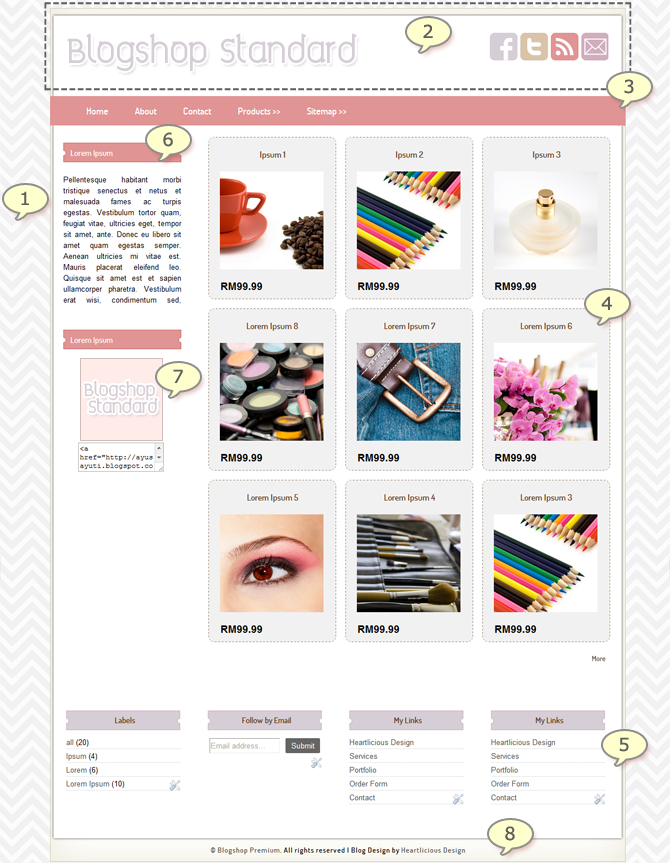
Blogshop Standard is a blogshop design theme on Blogger platform created for those who need a decent blogshop. The products are displayed in a gallery layout for the visitors' ease viewing and better shopping experience!

The following is a list of the elements which are included in the package. Each of these elements will be designed in a full coordinating set of graphics that will give your blogshop a fresh and fabulous look.


1 Background Design. Background lies behind the blog content in the foreground. It fills the rest of the area behind the layout.
2 Header Design. Just like the name, header is the head of a blog. It's located on the top most part. Normally it consists of the blog title, images or your Logo.
3 Menubar. A menubar is a row of links which normally lead to main pages of the blog. Often a menubar is a text based which is placed under the header. In Blog Design, it's a trend to have a graphic menubar combined into the header.
4Gallery Layout. This is a non-conventional blog layout. Perfect for your blogshop.
5Footer Columns. This is where you can put your extra links or even more widgets.
6Sidebar Title Graphic. Sidebar is where accessories or widgets of a blog are placed. The title graphic can be created to suit your overall design.
7Button with Grab Code. Grab button is like one of the marketing gadgets which readers can grab and place on their own blogs. It will serve its purpose, bring more people to your blog. The grab code will be placed at the bottom of the button. This is the code for the grab button to work. Convenient for those who are willing to take your button. They just need to copy and paste your button on their sites.
8Footer Image. This is the bottom part of a blog which normally lists navigation and copyright statements. The graphic can be designed to suit your entire design.

Blog Design Package: Blogshop Premium


I am so pleased to launch a NEW Blogshop theme: Luscious Blogshop Premium. Blogshop Premium is a rich blogshop design combo on Blogger platform created for those who need a unique and decent blogshop. It has a Welcome Homepage which acts as an introductory page for the products or services you are offering. The products are displayed in a gallery page for the visitors' ease viewing and better shopping experience. This package also comes with three (3) slider images for a perfect product slideshow. You may also add on more images as needed. And there are more detailed features offered in this package!

The following is a list of the elements which are included in the package. Each of these elements will be designed in a full coordinating set of graphics that will give your blogshop a fresh and fabulous look.


1 Background Design. Background lies behind the blog content in the foreground. It fills the rest of the area behind the layout.
2 Header Design. Just like the name, header is the head of a blog. It's located on the top most part. Normally it consists of the blog title, images or your Logo.
3 Menubar. A menubar is a row of links which normally lead to main pages of the blog. Often a menubar is a text based which is placed under the header. In Blog Design, it's a trend to have a graphic menubar combined into the header. A Dropdown Menubar is a set of links that appear when the mouse hovers the Menubar.
4 Slider Images. Image galleries and sliders are very common on sites and are also useful for any other type of site for displaying images and photos. This is perfect to display products or services.
5 Main Buttons. This is where you can display featured parts of your site such as your main offered items, Sales, etc whatever you want people to alert what you have to offer.
6Gallery Layout. This is a non-conventional blog layout. Perfect for your blogshop.
7Footer Columns. This is where you can put your extra links or even more widgets.
8Sidebar Title Graphic. Sidebar is where accessories or widgets of a blog are placed. The title graphic can be created to suit your overall design.
9Page Numbering. Page number will be displayed for the visitors' ease reference.
10Button with Grab Code. Grab button is like one of the marketing gadgets which readers can grab and place on their own blogs. It will serve its purpose, bring more people to your blog. The grab code will be placed at the bottom of the button. This is the code for the grab button to work. Convenient for those who are willing to take your button. They just need to copy and paste your button on their sites.
11Footer Image. This is the bottom part of a blog which normally lists navigation and copyright statements. The graphic can be designed to suit your entire design.


Feel free to visit the Demo Page. If you want to bring your Blogger store to a next level, Blogshop Premium is the best choice for you!

Featured Blog Design: Chomey toU Kraf


ChomeytoU Kraf is a blogshop selling craft supplies and receiving handmade crafts as well. The design was considered a quick process because Maizah, the owner of the blog, knew exactly what she needed. She wanted a cute design with a girl sewing and sitting on a tree swing in a garden with flowers, bees under a blue sky and a plane passing by. If you look at the footer, that's where I put the details of the garden fence and the flowers.

Please visit the blog here! to see it live and appreciate the design more :D. Good luck to Maizah!

Featured Blog Design: Suri Aryani


This is a blog design for Suri Aryani, one of the member of the Scarflets. Knowing that she's a stylish lovely person, I want her blog to balance her character. And at the same time,  the blog shouldn't be dominant than her beautiful blog content.

I needed a sleek design, not too much elements but will still be able to stand out. I was so glad that she loves it! This is the blog to see it live.

Giveaway!

Who doesn't like giveaway?! There's a giveaway for free Digital Scrapbook Software sponsored by My Memories Suite


I'm not hosting the Giveaway, It's my friend, Peggy of Cloth With Pegs. She's a one creative girl! Look at how she crafts and invents things. She's also good at sketching. So this is her very first giveaway and I'm excited about it. Please head on to her blog and participate. Thanks and cheers! :D

Featured Blog Design: Excited yet Nervous


This blog sounds so familiar to me and maybe to some of you. Of course! It's actually my personal blog which had been neglected since last November. However, I recently felt like I'm supposed to continue blogging since I had missed bunch of things. The very first intention to create it was because of my son. I recorded almost each of his milestones and my love letters with the hope that he'll be able to read them one day.

In order to get the new spirit, I decided to do a makeover to the blog design. The concept is 'modern and simple'. Unlike the previous designs, this time it comes with a very little green (my favorite color!) and a bit more to grey. Not too many graphics but it's kind of refreshing. To view it live, here is the link!

Featured Blog Design: Something Sweet


This is a blog design for Something Sweet Craft Blog. It is a sweet pink design, with 'Vintage" as the theme. Vintage style very often becomes design inspiration. Whether you like it or not, vintage elements are now running wild. They are reclaimed and repurposed from fashion, home décor to crafting supplies. Now it’s even right down to Blog Design! You can combine the delicate vintage and modern elements together to create something inspirational.  

You may visit the blog here to see it live.

Featured Blog Design: Kawaii Cotton


If you remember this post on the Sundae Brights colour inspiration, well the preferred colours for this Kawaii Cotton's design were inspired from the colour scheme. The theme was about fabric and sewing with added flowers to make it cheerful. I'd like to say thank you to Nureen of Kawaii Cotton for her faith in me. This was her third order! Please visit the site here.

Featured Blog Design: MamAlya Boutique


The owner of MamAlya's boutique is a repeat client of Kami blog. I tell you she's a sweetheart and easy to work with. The preferred color is pink! The concept that I would like to introduce is "Fun and Elegant". That's where I put the sweet polka dots.

You know that less is more, minimalist is somehow a better option. With stripes background and matching social media icons, voila here's the layout. And she loved the first draft. Yay! 

You are invited to visit the site here. She sews and creates various pretty stuff.

Colour Inspiration


Today's colour inspiration is what is called Sundae Brights from DesignSeeds.com. Sweet colour for your everyday-look and (of course) your blog.

Frequently Asked Questions


Please have a look at these FAQs. If you require further information, the Contact Form is always open for you. Thank you :)


A: You are expected to fill out the Request a Quote Form and be as detailed as possible since it will help me get the best view to understand the design you expect. I will email you with the Quotation upon receiving your form. Once we've agreed on the project details, an Invoice with item & payment particulars will be emailed to you.

This link >>Here<< will explain you on the design process. It's a step by step explanation, you'll find it handy! You may also want to read the Terms of Service. Trust me, it can be a complete useful guideline.
[ Back to top ]

A: It really depends on the scope of the project, how quick your response to my emails, how specific your input throughout the design process and the revisions needed. Each project is unique and may require more or less time to build. My target to complete a project is 10 days. I schedule two projects at a time. However, please understand that this is only an estimated time frame. It's not unlikely to have projects that are extended, which are mostly due to communication and revisions. Sometimes it's not always on how quick I finish my work but more to a reflection on the amount of active projects I currently have in hand.
[ Back to top ]

A: Yes, I do require a deposit of 50% of the total amount of your design in order to secure your place on my design schedule. Final Payment is due before design installation or issuance of final products. Please note that this deposit is non-refundable.
[ Back to top ]

A: Once your deposit is made, your name will be added onto the Schedule. The time frame with your name on it, is the estimated time of when your design will be commenced. You can expect your first draft within this scheduled timeline. Please note that the latest date shown in the timeline for each project does not mean a completion date.
[ Back to top ]

A: This Design Schedule is a first come, first serve basis. Our waiting list fills up quickly, so it is always best to book at your earliest convenience.
[ Back to top ]

A: Once you're confirmed on the schedule, I will send you a set of Design Questionnaire to be filled in. My work will be based on your brief. Should there be any uncertain things, I will email you to gather information. Discussion and the design process will be done during your designated time frame only as I have to focus on the clients whose designs are currently scheduled.
[ Back to top ]

A: I'm really sorry, due to the current demand for the services, I am unable to accept rush orders. Placing a rush order means adding you to my overtime schedule and current orders won't be affected. I wish I have the extra time to do it for you. With my full time job during the day and the boys at home during the evening, agreeing to work overtime means skipping my night sleep. If you wish to find other designer urgently, please let me know as I'd be happy to introduce you to my other designer friends.
[ Back to top ]

A: Please apologize cause I'm no longer taking order for loose elements. I only offer a complete blog design package and with those loose items as the additional to the package so that your other social media can match the main site.
[ Back to top ]

A: No, I don't design printable graphics.
[ Back to top ]

A: I allow one (1) major and three (3) minor revisions.
[ Back to top ]

Q: How's the installation process? When do you need my username and password?
A: You don't have to forward your account log in information. You just need to grant me permission to access your blog by doing the following two simple steps:
1. Please go to Blogger Dashboard >> Settings >> Basic >> Permissions >> Under 'Blog Authors' Click '+ Add Author' and insert my email address rose@heartliciousdesign.com to invite as Author.
2. Then once I approve, please go to the same place as above and change the 'Author' tab to 'Admin'.
[ Back to top ]

A: No. Your posts and sidebar information will remain on your blog. They will move around but you still can arrange them according to your liking. However please be advised that it shall be your responsibility to back-up your template and contents, including all the HTML codes of your widgets just in case something should go wrong.
[ Back to top ]

Q: Will you upload and manage the content of my blog?
A: No, it is your responsibility to upload all of your contents including the widgets. I only handle the design and installation. Should you have any questions after installation, I will give you a week time to work with your new layout with my assistance.
[ Back to top ]

A: Yes, I now work on WordPress platform.
[ Back to top ]

A: Please apologize, I prefer communication through email only. It's easy for me to keep all records and instructions from every client. They could get mixed up easily. Furthermore, I don't talk about blog designs during my day work. Normally if I'm not at work, I would be probably around my children. You know it's quite difficult to talk when you have kids clinging to you :)
[ Back to top ]
 

Love Us on Facebook

Share the Love

HEARTLICIOUS DESIGN